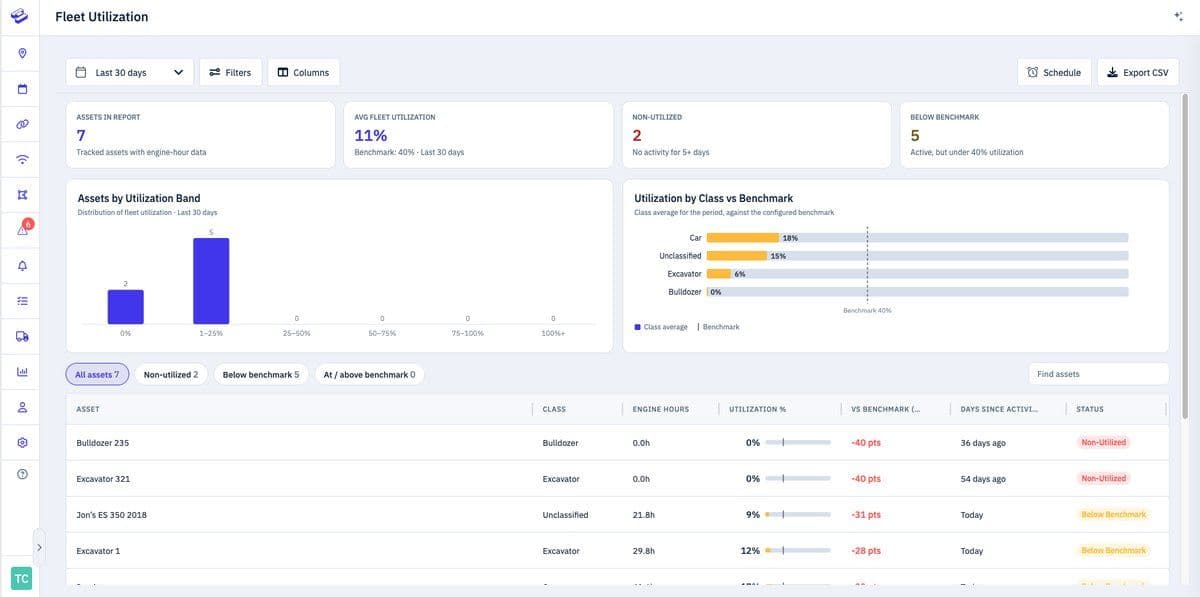
We've been heads-down shipping, and there's a lot to catch you up on. This update brings two brand-new reports, more flexible report scheduling, a cleaner and more useful live map, and a round of upgrades to how you view and manage your assets — all aimed at helping you find what you need faster and act on it with fewer clicks.
A new Speeding Report
You can now see exactly where and when speeding happened across your fleet. The Speeding Report groups events by severity — from minor to severe — so you can spot patterns at a glance and focus coaching where it matters most. Speeds and thresholds follow your account's unit settings, whether that's mph or km/h.
A new Engine Runtime Report
The Engine Runtime Report gives you a clear view of how many hours your equipment is actually running. It's a simpler way to track utilization and plan maintenance around real engine hours instead of the calendar.
Scheduled & quarterly reporting
Reports can now run on a schedule and arrive automatically — no more pulling them by hand. We've also added a quarterly cadence and brought scheduling to the Distance Report, which is especially handy for recurring needs like quarterly IFTA filing.
A cleaner, more consistent report layout
We standardized the header and controls across reports so every report looks and behaves the same way. Filtering, date ranges, and exports now live where you expect them, making reports easier to read and quicker to use.
Asset Status (formerly Custom Status Labels)
We renamed Custom Status Labels to Asset Status to make the feature clearer and easier to find, along with usability improvements to how you set and manage statuses. Same powerful labeling — now far more intuitive.
Bulk actions on the map: View on Map & Change Status
Select multiple assets and act on them at once. View on Map filters the map to just the items you've checked, and Change Status lets you update Asset Status across many assets in a single step.
A time selector for the recent history line
You can now choose the time window for an asset's recent history line on the map, so you see exactly the stretch of activity you care about instead of a fixed range.
Redesigned Places: profiles & map cards
Places got a refresh. New place profiles and updated place cards in the live map surface more useful detail about each location, making your saved places far more actionable.
Upgraded asset profiles & settings
We reworked the asset profile and tracker settings pages so the information you need is easier to find and edit. Managing an individual asset is now cleaner and more straightforward.
Better tracker cards for OBD & battery devices
Tracker cards for OBD and battery-powered devices now show more useful top-line stats at a glance, so you get the most relevant status for each device type without digging in.
History line improvements on mobile
We brought tracker history line updates to mobile, so reviewing where an asset has been is smoother when you're away from your desk.
A new Equipment Rental Dashboard
For teams managing rental equipment, the new Equipment Rental Dashboard brings the metrics that matter into one place — making it easier to keep tabs on utilization and your rental fleet at a glance.
Have feedback or a feature you'd love to see next? We'd love to hear from you — get in touch.
Explore Hapn on a live equipment fleet
Click around the real platform — a live mixed fleet with dummy data. No sales call, takes a few minutes.
Volume discounts • No 3-year contracts • Quote in ~24 hours
Related Articles

Get the latest news straight to your inbox.
Share Article
